Agents
Telephony
Never again miss a call, put the caller on hold or make them go though the pain of IVR - your Agent takes care of that. Serve every customer as & when best works for them. An experience they will remember!
How does an Agent start answering calls?
This happens by assigning a phone number to an Agent. Envocal takes care of the rest!
- Navigate to your Agent
- From the Agents tab on the lefthand side, navigate to the Agent, click Edit Agent
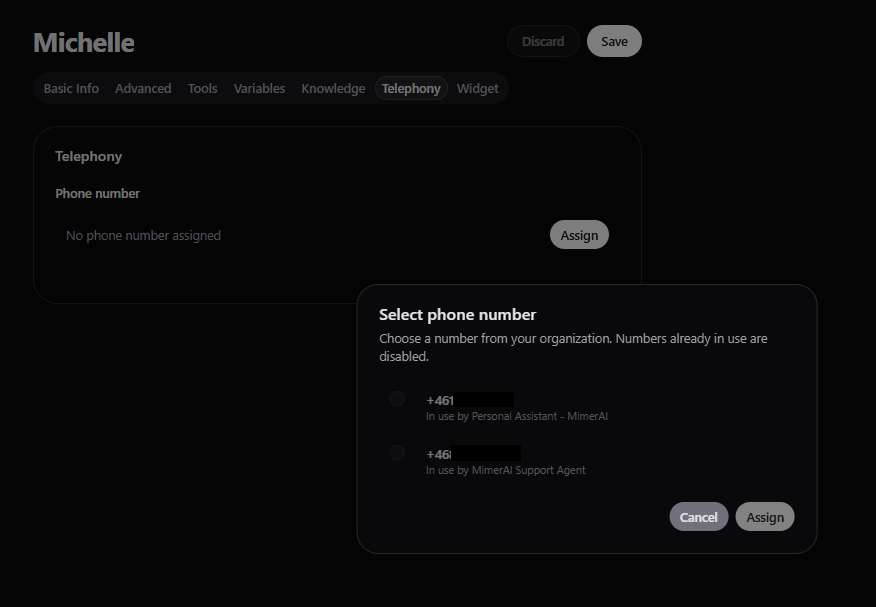
- Go to Telephony tab, click Assign
- You’ll see this option in the Agent settings.
- Choose a number
- Select a number from the list.
- Click Assign
- That’s it! The number is now linked to your Agent.
- Test it out!
- Call the number from your phone and talk to your Agent!
Remember
Each number works for one Agent at a time. You can change or remove the number anytime.
To unlink an Agent from an assigned number, navigate to the Agent’s Telephony tab, click Unassign.
Knowledge
This is the place where Agent gets specific and necessary knowledge about your business, products, services, processes and more, depending on its roll and purpose. Everything a human Agent would know and beyond.
Widget
Easily tailor the widget to your brand's look & feel. Keep it perfectly aligned with your brand & communication style.